
Payments & refunds
Transaction in the sidebar lists every payment taken at a location on one day: what came in, how it was paid, and what needs attention.
Open Transactions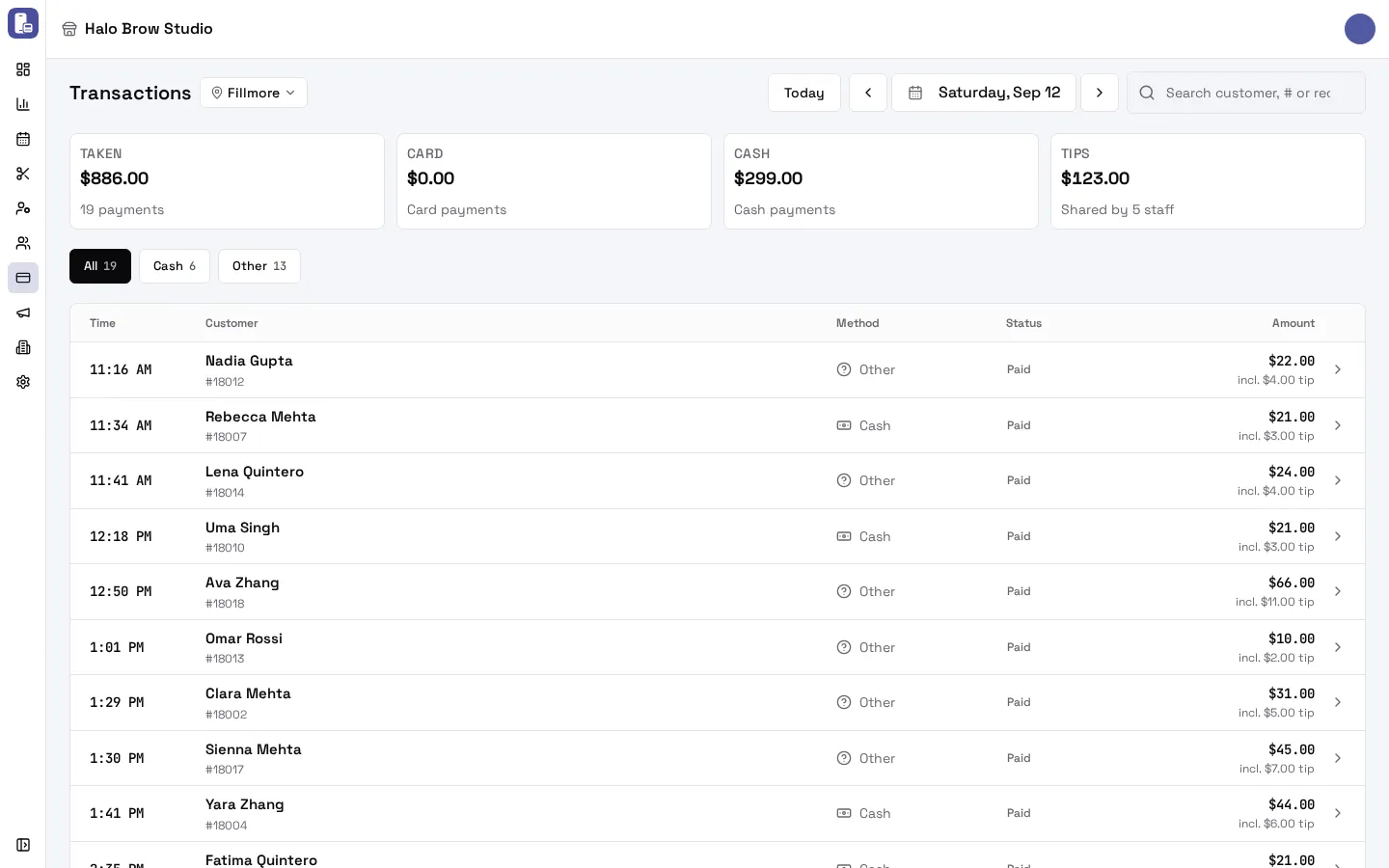
What do the tiles mean?
Section titled “What do the tiles mean?”| Tile | Meaning |
|---|---|
| Taken | Everything taken that day after refunds (card + cash + other) |
| Card | Card payments: on the terminal, a card on file, or online (deposits) |
| Cash | Cash payments |
| Tips | Tips, and how many staff share them |
Failed, canceled and pending payments add nothing to the totals.
How do I find a payment?
Section titled “How do I find a payment?”- Day: Today, the arrows, or the date.
- Search by customer name, payment number (#) or receipt id.
- Chips: by method (Card, Cash, Other) or by what needs attention:
- Refunded: money was given back (in full or in part).
- At the till: a payment started but not finished yet.
- Failed: a payment that didn’t go through.
Other means a payment taken outside FocalPOS and recorded on the tablet (for example a check or a bank transfer).
Each row shows the total including the tip, with “incl. $X tip” or “−$X refunded” under it. Click a row to see the details: what was charged, the card (brand and last four digits), cash given and change, each person’s tip share, the appointments it paid for, and any refunds with their reason.
How do I refund a payment?
Section titled “How do I refund a payment?”From the dashboard you refund everything left on a payment.
- Click the payment to open its details.
- Press Refund.
- Choose a Reason: Customer asked, Service issue, Wrong amount, Duplicate payment or Other (Other needs a note in What happened).
- Check the amount and press Refund.
What happens next depends on the payment:
- Card, same day: the payment is usually voided, so the charge never reaches the client’s statement (“Payment voided”).
- Card, later: the money goes back to the card (“Refunded”). If the card processor hasn’t confirmed yet, it says “Refund sent”.
- Cash or Other: hand the money back in cash. FocalPOS records it as a cash refund (“Cash refund recorded”).
Who can refund?
Section titled “Who can refund?”Members allowed to Issue refunds (set in Members). The dashboard doesn’t ask for a PIN; the tablet always asks for the PIN of an employee who may issue refunds.
Troubleshooting
Section titled “Troubleshooting”I don’t see a Refund button
Section titled “I don’t see a Refund button”The payment can’t be refunded: it’s already fully refunded, it failed or was canceled, a refund is still pending, or you aren’t allowed to issue refunds.
“This card can only be refunded in full.”
Section titled ““This card can only be refunded in full.””Some card payments can only be refunded for their whole amount, so a partial refund is refused. Refund the whole payment instead.
“Refund declined” or “The processor refused it. Nothing went back.”
Section titled ““Refund declined” or “The processor refused it. Nothing went back.””The card processor refused the refund, for example because the card account was disconnected. Nothing was refunded. Try again later, or contact support@focalpos.com.
Can I refund a cash payment?
Section titled “Can I refund a cash payment?”Yes. Press Refund, then hand the cash back. It’s recorded as a cash refund, and it shows in the cash drawer session.
Where’s the deposit refund for a cancelled booking?
Section titled “Where’s the deposit refund for a cancelled booking?”Deposit refunds run automatically within about a minute of a cancellation that qualifies. They show here as a refund with the reason Deposit policy. If the appointment shows Refund failed, refund the deposit payment here by hand.
Why are payments in the list but missing from the Card total?
Section titled “Why are payments in the list but missing from the Card total?”Only completed payments count. At the till and Failed payments are listed but add nothing.