
The employee app
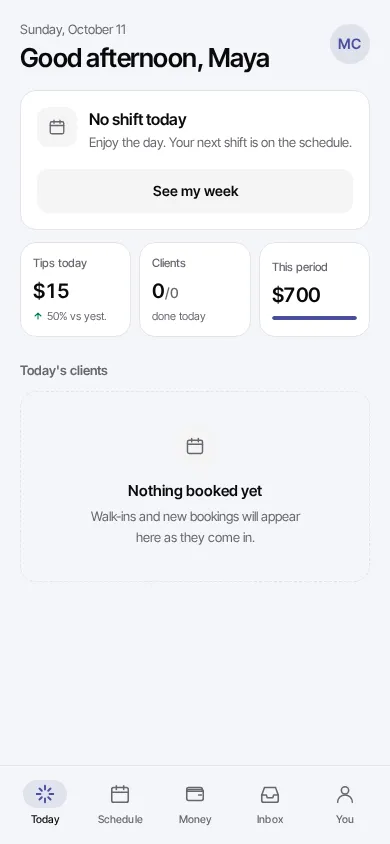
Your team gets their own app on their phone. They see their day, clock in and out, check their schedule and track their earnings, without access to your dashboard.
How do staff sign in?
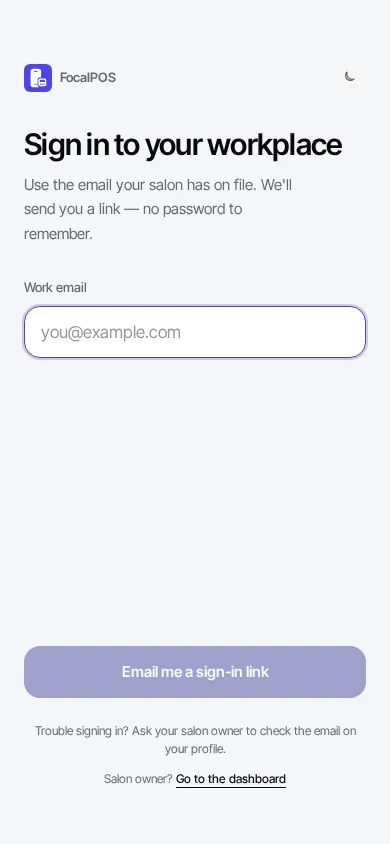
Section titled “How do staff sign in?”There’s no password. Staff sign in with the email on their employee profile.
- Add their email when you add them (or later on their page, under Details).
- Send them to focalpos.com/employee on their phone.
- They enter their Work email and press Email me a sign-in link.
- On the Check your email screen, they tap the link in the email. Or they press Enter the code instead, type the 6-digit code from the email and press Sign in with code.
Someone who works at more than one location or salon picks one on Where are you working?. They can switch later on the You tab, under Workplace.
What’s in the app?
Section titled “What’s in the app?”| Tab | What they do there |
|---|---|
| Today | Clock in and out, see their shift, today’s clients, tips today, clients done and pay this period |
| Schedule | Their shifts and clients for each day of the week, and their usual week |
| Money | Take-home so far this pay period: wages, commission, tips and booth rent, a tips chart, and past pay periods |
| Inbox | Questions and announcements from the salon. “Needs your answer” lists the questions waiting for them. |
| You | Their photo, their last 30 days, their pay terms, when their PIN was last changed, their workplace, and the app’s look (Auto, Light, Dark) |
More: Clocking in & today’s clients and Schedule & pay.
Troubleshooting
Section titled “Troubleshooting”“No workplace found”
Section titled ““No workplace found””The email they typed doesn’t match the email on their employee profile. Fix the email on their page in Employees > Staff (under Details, then Save). Then they tap Check again.
“Couldn’t load your workplace”
Section titled ““Couldn’t load your workplace””Something went wrong on our side or their connection dropped. They tap Try again. If it keeps happening, email support@focalpos.com.
“That link didn’t work”
Section titled ““That link didn’t work””Sign-in links only work once and only for a short time. They go back to focalpos.com/employee and ask for a new link, or use the code instead.
The email never arrives
Section titled “The email never arrives”They check spam, then press Resend link on the Check your email screen. Make sure the email on their profile is spelled right, or press Use a different email.
Can staff use the app to log in to my dashboard?
Section titled “Can staff use the app to log in to my dashboard?”No. The employee app only shows their own day, schedule and pay. To give someone the dashboard, invite them as a Member.
Is the employee app the same as the front desk tablet?
Section titled “Is the employee app the same as the front desk tablet?”No. The tablet at your counter is shared by everyone, and staff sign in on it with their 8-digit PIN. The employee app is each person’s own phone.